Updated August 2026
Get started with Memoria
Tap-by-tap guide using the real Memoria app layout. Generic examples only - your family names and photos stay private inside your Circle.
Three skills: create a Circle, tag moments in an Event, and ask Memoria AI.
MEMORIA
Relive every moment beautifully
Entering your memory world
Download first
Memoria is free on Google Play and the App Store. 10,000+ memories included. No credit card.
Already installed? Jump to step 1 · Save WhatsApp photos
Feature 1: Create a Circle
Private group for family, friends, or festival guests
Step 1
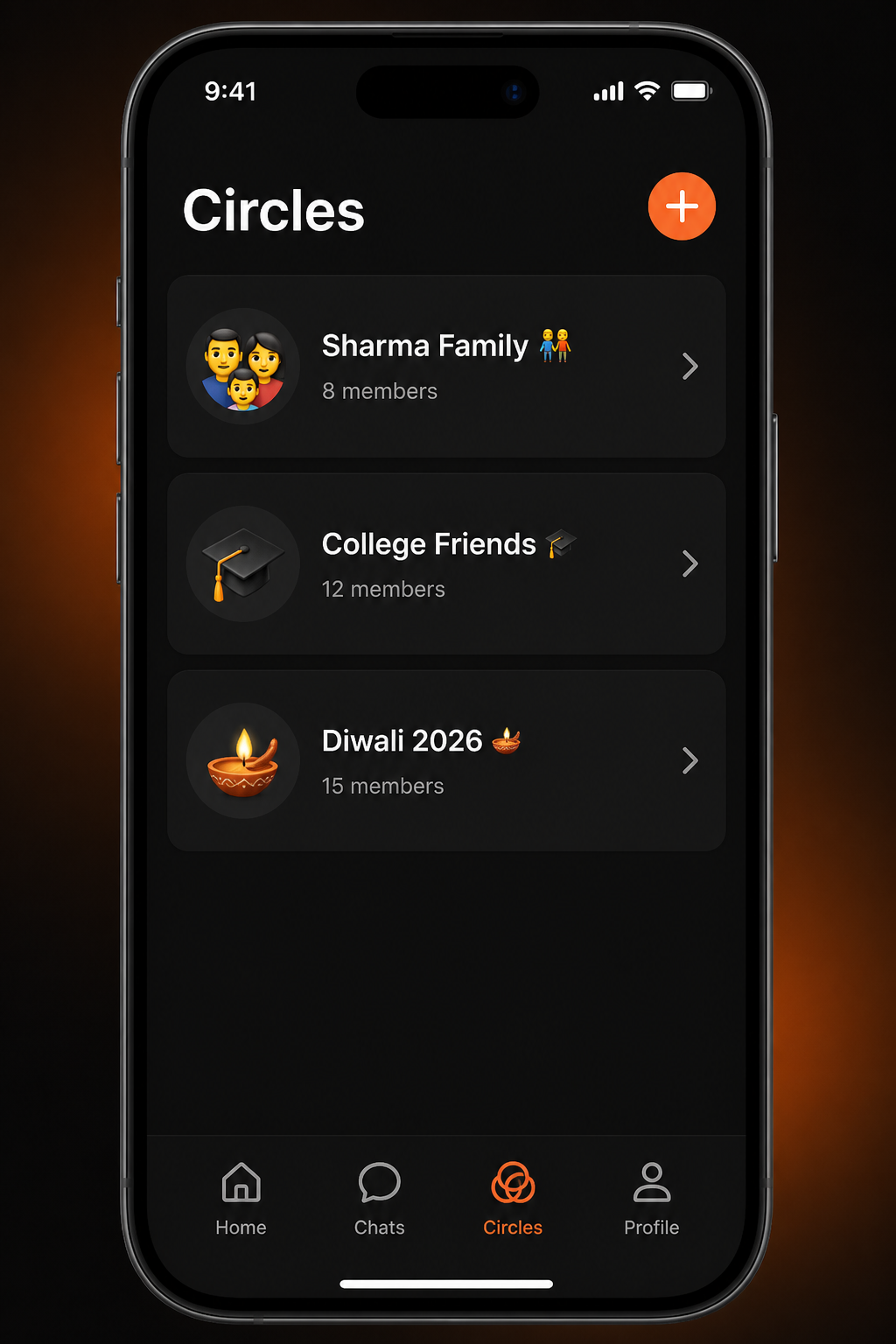
Open Circles and tap +
After you sign in, open the Circles tab. Tap the orange + button to start a private group only people you invite can see.
Tap Circles → +
Circles
Share moments privately
Sharma Family
8 members · Admin
College Friends
12 members · Admin
Diwali 2026
6 members · Admin
Step 2
Name your Circle
Pick a name your family recognizes - "Sharma Family" works better than "Circle 1." You become admin and control who joins.
Name it → Create
Sharma Family
8 members
Photos
42 Photos
Events
2 Events
Recent gatherings
Diwali at Home
12 Nov 2026 · 18 photos
Step 3
Create an Event inside the Circle
Tap the orange + on the Circle page, then Create Event. Events keep Diwali, birthdays, and trips separate instead of one messy album.
Tap + → Create Event
Sharma Family
8 members
Photos
42 Photos
Events
2 Events
Recent gatherings
Diwali at Home
12 Nov 2026 · 18 photos
Step 4
Invite family on WhatsApp
Tap Add Member and share the invite link on WhatsApp. Parents on iPhone and siblings on Android can join the same Circle.
Add Member → Share link
Sharma Family
8 members
Photos
42 Photos
Events
2 Events
Recent gatherings
Diwali at Home
12 Nov 2026 · 18 photos
Feature 2: Tag moments in an Event
Full-resolution photos with caption, mood, and Hinglish AI
Step 1
Open an Event and tap +
Inside "Diwali at Home" (or any Event), tap + to add photos. Choose Gallery Photos for existing shots or capture live with Memory Camera.
Event → +
Diwali at Home
12 Nov 2026 · 18 photos
Memories
SELECTStep 2
Capture with Memory Camera (optional)
Memory Camera includes Archive Mode and warm filters made for family moments - not performative social media shots.
Memory Camera → shutter
✦ Memory Camera
ARCHIVE MODE
Step 3
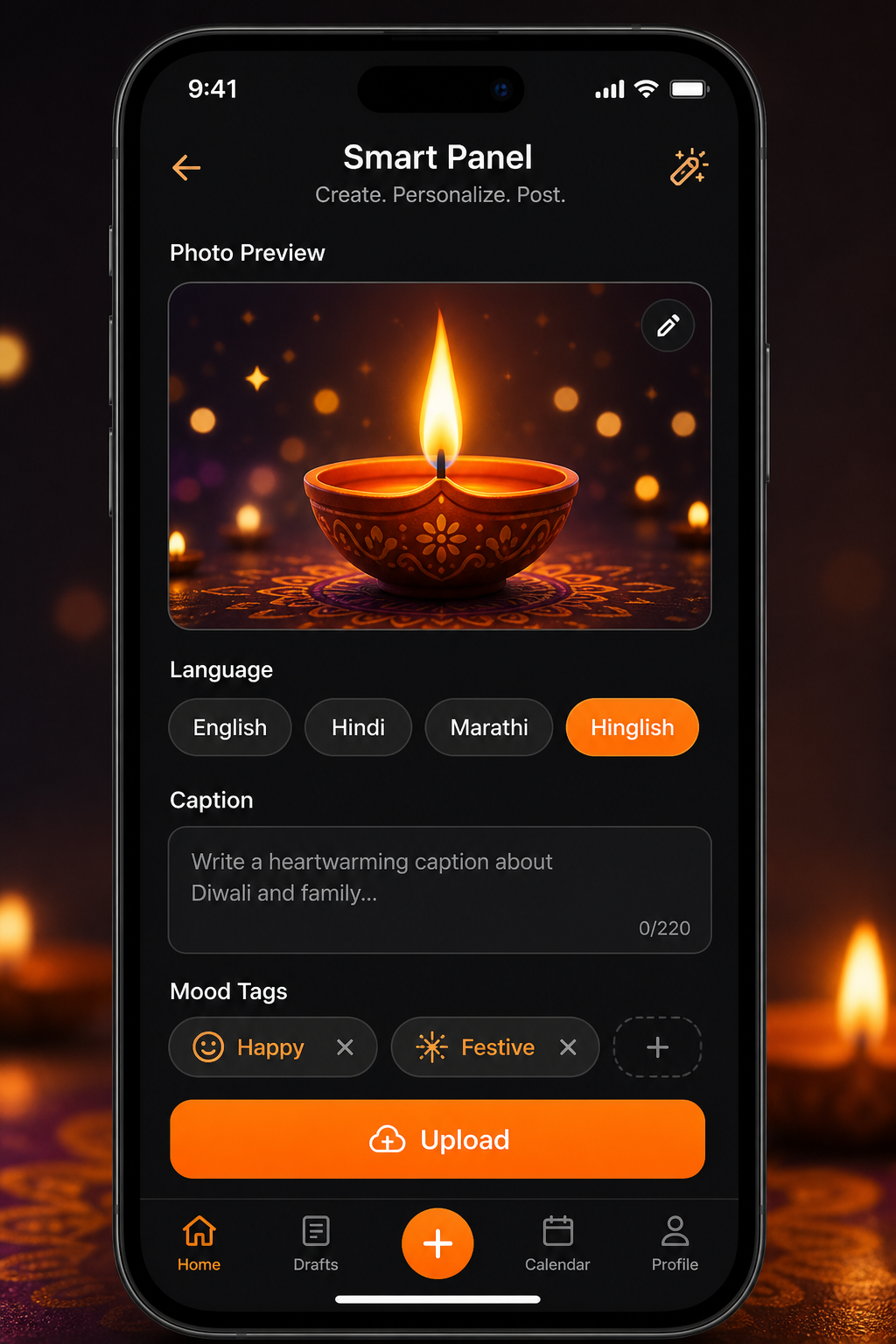
Caption, mood, then upload
When you add a memory you can write a caption in English, Hindi, Marathi, or Hinglish. Pick a mood, then tap Upload so the story stays with the photo.
Caption → ↑ Upload
Caption
Mood
Step 4
Everyone sees the same timeline
Uploaded memories appear on Home and inside the Event in full resolution. Family reacts with hearts - no algorithm deciding what they see.
Home → scroll timeline
August 9, 2026
July 26, 2026
July 17, 2026
Feature 3: Memoria AI (The Curator)
Search shared family memories - not the open web
Step 1
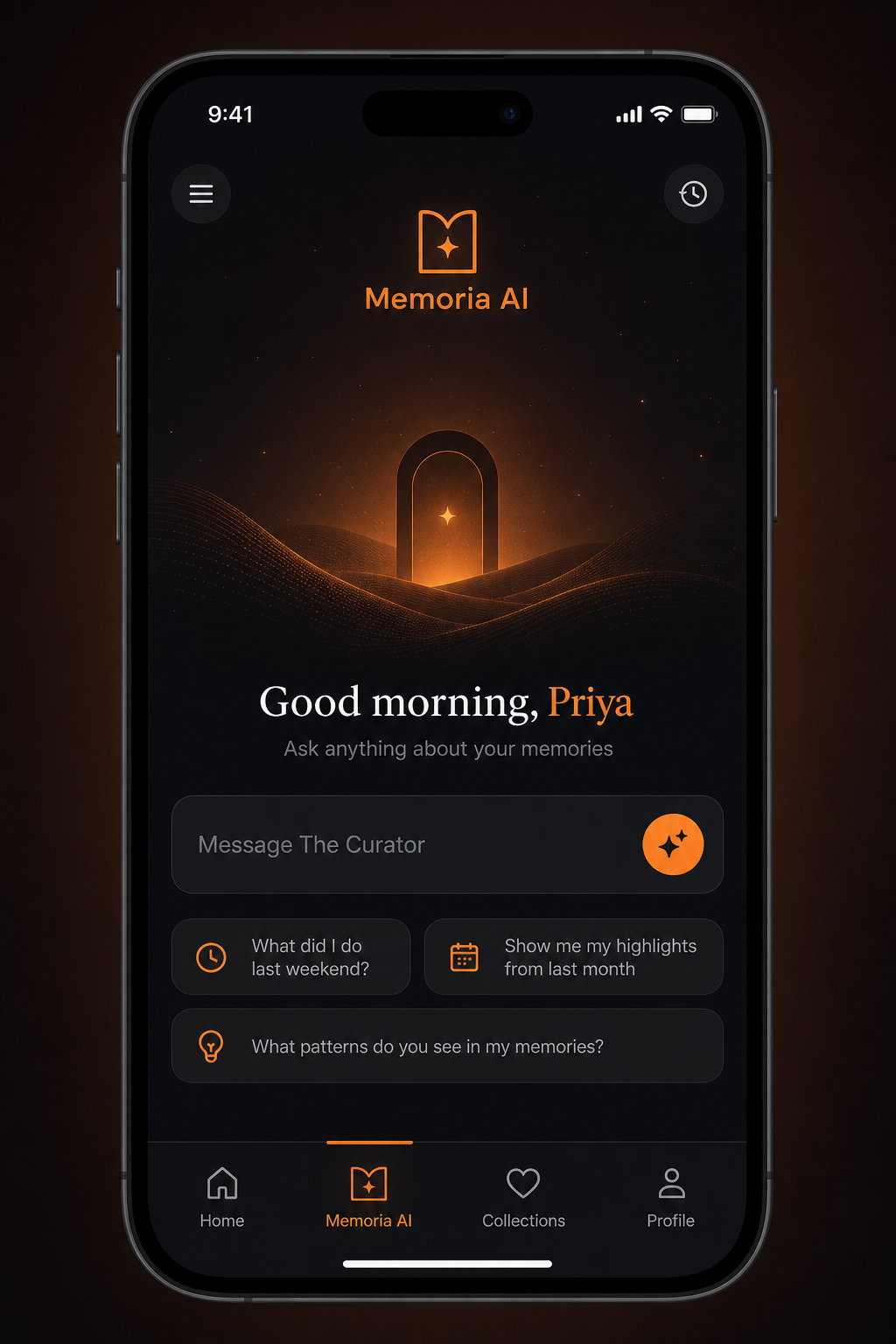
Open Memoria AI tab
Tap Memoria AI in the bottom bar. The Curator greets you and searches your shared Circle memories - not the public internet.
Bottom bar → Memoria AI
Good morning, Priya
Ask anything about your memories.
Step 2
Ask in Hinglish or English
Try "dadi ke saath Diwali wali photo" or "last weekend trip with cousins." Memoria AI understands Indian family language naturally.
Type or tap 🎤
Good morning, Priya
Ask anything about your memories.
Step 3
Get answers from your Circles
Results come from photos your family uploaded - voice notes, Events, and faces your Circle already shared. Not a generic chatbot.
Review surfaced memories
August 9, 2026
July 26, 2026
July 17, 2026
You are ready when...
- One Circle exists with a name your family recognizes
- One Event inside it with at least three photos uploaded
- One relative invited and able to open the timeline
- You tried one Memoria AI question in Hinglish or English
Common questions
How long does Memoria setup take?
Most families finish in under five minutes: download, create a Circle, add one Event, invite on WhatsApp, upload three photos. Updated August 2026 for Google Play and App Store.
Can iPhone and Android users share one Circle?
Yes. Memoria works on both platforms. Create the Circle on either phone and invite everyone with one WhatsApp link.
How do I tag a moment in an Event?
Open the Event, tap +, add photos from gallery or Memory Camera, write a caption if you want, then upload. Everyone in the Circle sees the same timeline.
What is Memoria AI?
Memoria AI (The Curator) searches memories inside your private Circles in Hinglish or English. It is Social Memory AI - not ChatGPT.
Your family timeline is one download away
Start with Sharma Family or your own name. Diwali, birthdays, and everyday moments - all in one private Circle.
Full download page · Photo app for friends · Pick your use case · Memoria AI · Personalized AI