Memoria app download
Memoria is the world's first Social Memory app - private family Circles, full-resolution photos, no algorithm. Free on Google Play and App Store. Built in India for Indian families.
New to the category? What is Social Memory? · Full download guide
Best Google Photos Alternative India
Google Photos gives you 15 GB free - then charges in USD, runs ads, and stores your family photos on American servers. Here are the 12 best Google Photos alternatives for India in 2026, with INR pricing, privacy ratings, and honest pros and cons.
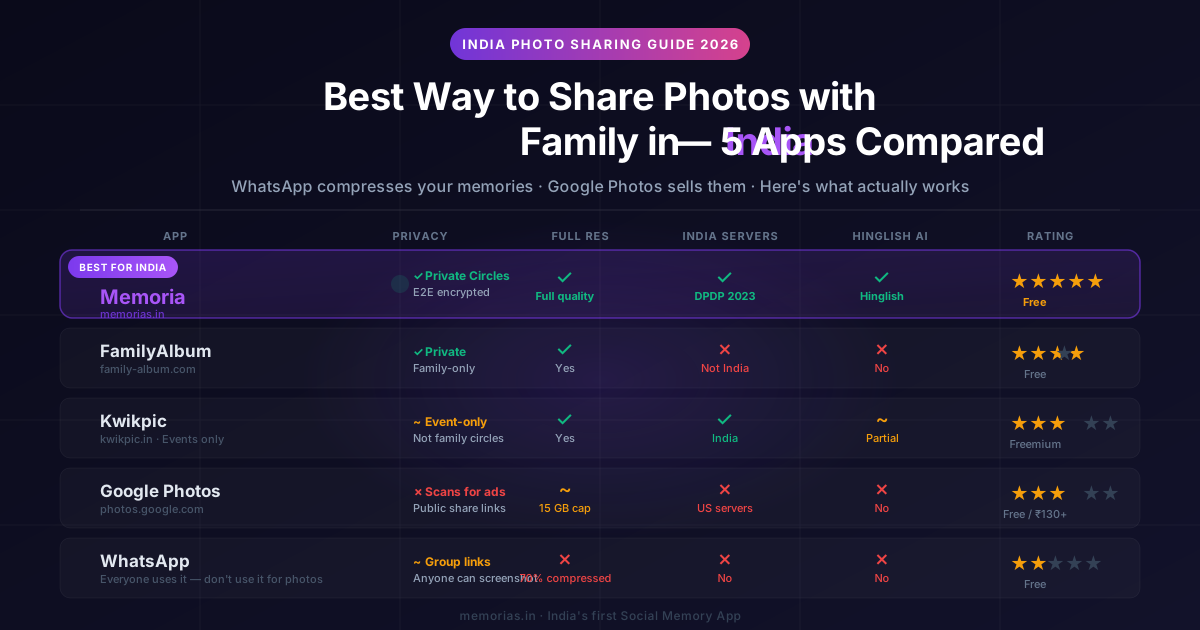
See how Memoria compares to Google Photos
Private Circles for family sharing, Indian servers, and WhatsApp photo rescue - not just another cloud backup.
- 1
Download free
Google Play - 10,000+ memories
- 2
Create a Circle
Invite family on WhatsApp
- 3
Add an Event
Festival, trip, or baby milestone
⚡ Quick Answer
Google Photos alternative India: the right pick depends on what you value most. For private family sharing with Indian servers: Memoria (free on Google Play and App Store). For maximum free cloud storage: DigiBoxx (20 GB free) or JioCloud (5 GB free, ₹39/month for 50 GB). For end-to-end encryption: Ente Photos (open-source, audited). For Prime members: Amazon Photos (unlimited photo backup included).
Each app excels in a different area - see the full comparison of all 12 options with detailed pros, cons, and verdicts below →
Google Photos Alternative India - Why Switch in 2026
Google Photos was free and unlimited until 2021. Then Google capped it at 15 GB (shared with Gmail and Drive) and started charging in USD - with no INR pricing option. For Indian families with thousands of wedding and festival photos, the 15 GB cap fills up in under a year.
Beyond storage, privacy concerns have grown. India's Digital Personal Data Protection (DPDP) Act 2023 gives Indian citizens rights over their data - but Google Photos stores everything on US servers under American law. Your family photos are subject to Google's advertising model, not Indian privacy protections.
Many couples receive their wedding photos as a Google Drive link - and then the link expires. We have a dedicated guide comparing the best options for storing and sharing wedding photos permanently.
Best Google Drive Alternative for Wedding Photos in India →Social Memory vs Google Photos - Full Comparison →How We Ranked These Google Photos Alternatives
Every alternative on this list was evaluated against 8 criteria that matter most to Indian users. No app paid for placement. No app reviewed this page before publication. Our methodology is transparent so you can weigh the criteria that matter most to you.
Disclosure: Memoria is built by our team. We ranked it where the criteria objectively placed it - as the strongest family sharing option with Indian servers. For pure bulk storage, JioCloud and DigiBoxx score higher on free tier size. For pure encryption, Ente leads. See the detailed breakdown below to make your own choice.
Google Photos Alternative India: Quick Comparison (All 12)
| # | App | Free Storage | Paid Plan | Made In | Privacy | DPDP Compliant |
|---|---|---|---|---|---|---|
| 1 | MemoriaOur pick | Free on Android and iPhone | - | 🇮🇳 India | ⭐⭐⭐⭐⭐ | ✅ Yes |
| 2 | JioCloud | 5 GB free | ₹39/month (50 GB) | 🇮🇳 India (Reliance Jio) | ⭐⭐⭐⭐ | ✅ Yes |
| 3 | DigiBoxx | 20 GB free | ₹30/month (100 GB) | 🇮🇳 India (NITI Aayog) | ⭐⭐⭐⭐ | ✅ Yes |
| 4 | Ente Photos | 1 GB free | ~₹420/month (50 GB) | 🌐 Global (open-source) | ⭐⭐⭐⭐⭐ | ⚠️ E2E encrypted (no server access) |
| 5 | Amazon Photos | 5 GB free | Free with Prime (₹1,499/year) | 🌐 Amazon (US servers) | ⭐⭐⭐ | ❌ US servers |
| 6 | iCloud Photos | 5 GB free | ₹75/month (50 GB) | 🌐 Apple (US/global servers) | ⭐⭐⭐⭐ | ❌ Global servers |
| 7 | Microsoft OneDrive | 5 GB free | ₹489/month (100 GB) | 🌐 Microsoft (US servers) | ⭐⭐⭐ | ❌ Global servers |
| 8 | Degoo | 100 GB free (ads) | ~₹420/month (500 GB) | 🌐 Sweden | ⭐⭐ | ❌ Global servers |
| 9 | pCloud | 10 GB free | ~₹840/month (500 GB) | 🌐 Switzerland | ⭐⭐⭐⭐ | ❌ Global servers |
| 10 | Flickr | 1,000 photos free | ~₹840/year (Pro) | 🌐 Global (SmugMug) | ⭐⭐⭐ | ❌ Global servers |
| 11 | IDrive | 10 GB free | ~₹185/month (10 TB) | 🌐 Global (US servers) | ⭐⭐⭐⭐ | ❌ Global servers |
| 12 | Piktures | Free (no cloud) | ~₹185/year (Premium) | 🌐 Global | ⭐⭐⭐⭐ | ❌ No Indian data residency |
Detailed Reviews: Each Alternative
#1Memoria🇮🇳 Editor's Pick
Best Google Photos alternative India - Social Memory, a new category better than cloud storage
- • Social Memory - a whole new category beyond dumb cloud storage
- • Private Circles: share memories with exactly who you choose, not the entire internet
- • Indian servers under DPDP Act 2023 - your data stays in India
- • WhatsApp-friendly sharing (family views without installing the app)
- • No ads, no algorithm, no data mining - ever
- • Free to download on Android and iPhone - no credit card required
- • Family timeline: memories organised by people and events, not just date
- • Newer than Google Photos - community growing fast
- • AI features expanding with each update
#2JioCloud
Best Indian cloud alternative
- • Indian company - data stays in India
- • Deeply integrated with Jio SIMs and Jio devices
- • Very affordable - ₹39/month for 50 GB
- • Simple WhatsApp-style album sharing
- • Works offline on Jio networks
- • UI less polished than Google Photos
- • Limited AI photo search
- • Best features are for Jio subscribers
#3DigiBoxx
Government-backed Indian startup
- • 20 GB free - most free storage from an Indian provider
- • Extremely affordable paid plans
- • Backed by NITI Aayog (government support)
- • Data stored entirely in India
- • Business plans available for teams
- • Photo experience is basic compared to Google Photos
- • No face recognition or smart albums
- • App quality still catching up
#4Ente Photos
Best for privacy purists
- • End-to-end encrypted - even Ente can't see your photos
- • Open-source (auditable code)
- • Available on Android, iOS, Web, Linux
- • On-device face grouping (not uploaded to cloud)
- • Family plan available
- • More expensive than Google Photos
- • Smaller free tier (1 GB)
- • No smart search by content
#5Amazon Photos
Unlimited backup for Prime members
- • Unlimited original-quality photo backup (Prime)
- • Good AI search and face recognition
- • 5 GB free video storage included
- • Works well on Android, iOS, and Fire devices
- • Already paying for Prime? It's free.
- • Data stored on US (Amazon AWS) servers
- • Requires active Prime subscription for unlimited backup
- • Amazon uses data for ad targeting
#6iCloud Photos
Best for iPhone users
- • Seamlessly integrated into iPhone/iPad/Mac
- • Good AI features (Memories, Spotlight search)
- • ₹75/month for 50 GB is very affordable
- • End-to-end encryption available (Advanced Data Protection)
- • Shared Albums with family
- • Only useful if you're in the Apple ecosystem
- • Photos not easily accessible on Android
- • Data stored outside India
#7Microsoft OneDrive
Best if you use Microsoft 365
- • 1 TB included with Microsoft 365 Personal (₹489/month)
- • Works across Windows, Android, iOS
- • Good integration with Windows PC for desktop photo viewing
- • Business plans available
- • Photo app experience is basic
- • No strong AI photo features compared to Google
- • Data stored outside India
- • Overkill if you don't use Office
#8Degoo
100 GB free - largest free tier
- • 100 GB free - by far the largest free tier
- • Simple backup interface
- • Works on Android and iOS
- • Ad-supported on free tier
- • Free tier requires opening the app regularly to maintain storage
- • No smart photo features
- • Data stored outside India
- • Privacy policy less transparent
#9pCloud
Lifetime plan option - no subscription
- • Lifetime plans available (pay once, keep forever)
- • Strong file versioning (rewind up to 30 days)
- • Based in Switzerland - strong privacy laws
- • Good desktop app for Windows/Mac
- • Lifetime plans are expensive upfront (~₹25,000+)
- • Photo experience is file-manager style - not a true photo app
- • Data not stored in India
#10Flickr
Best for photography communities
- • Strong photography community
- • Excellent EXIF data preservation
- • Very affordable Pro plan (~₹840/year)
- • Public portfolio and discovery features
- • Good for showcasing work
- • Not for private family sharing
- • Free tier limited to 1,000 photos
- • Data stored outside India
#11IDrive
Best for comprehensive backup
- • 10 GB free - decent starting tier
- • 10 TB plan is excellent value for large photo libraries
- • Includes cloud backup for PC and mobile too
- • Strong versioning and rewinds
- • Good for backing up RAW files and videos
- • Data stored outside India
- • Photo app experience is secondary to backup features
- • No native Indian sharing features
- • Interface feels dated compared to Google Photos
#12Piktures
Best Android gallery replacement
- • Excellent gallery replacement on Android
- • No cloud backup required - keeps photos local
- • Good face detection and calendar organisation
- • Smooth performance on large libraries
- • Free tier is fully functional without cloud
- • No cloud backup - photos stay on device
- • Not available on iPhone
- • No family sharing features
- • Free tier has no cloud sync
Social Memory - The New Google Photos Alternative India Needs
Every other app on this list is a cloud storage app with a photo viewer bolted on. Google Photos, JioCloud, DigiBoxx, Ente - they all do the same thing: take your photos, put them on a server, and give you a gallery to browse. That is the 2015 model. In 2026, Indian families deserve better. Social Memory is the first new category in photo apps in a decade - built for how families actually share memories, not just how they back up files.
Old Way Cloud Storage
- • Upload photos to a server
- • Scroll through a grid of thumbnails
- • Your data is the product (ads, AI training)
- • Share via public links anyone can access
- • Memories buried under thousands of files
- • You pay with money and your privacy
New Way Social Memory
- • Memories organised around people and events
- • Private Circles - share only with chosen people
- • No ads, no algorithm, no data mining
- • Family views via WhatsApp without installing app
- • Timeline that tells the story of your life
- • Free to download on Android and iPhone - no credit card
Social Memory means your photos are not just files on a server. They are memories - connected to people, places, and events. Memoria organises them into private Circles so your family sees the photos that matter to them, your wedding album stays with your wedding guests, and your daily moments stay with your closest people. No algorithm decides what you see. No advertiser learns from your memories.
Google Photos was built in 2015 for a world where "cloud backup" was enough. In 2026, Indian families want more: privacy, control over who sees their memories, and data that stays in India. Social Memory is what comes after cloud storage - just like WhatsApp replaced SMS and streaming replaced cable TV. Cloud storage dumps your photos on a server. Social Memory weaves them into your life.
Ready to try Social Memory?
Try Memoria Free - No Credit Card →Indian servers · DPDP Act 2023 · No ads ever
Self-Hosted Google Photos Alternative India Options
For users who want complete control over their photo data with no monthly fees, self-hosted alternatives to Google Photos let you run your own photo server. These are the best options for tech-savvy Indian users.
Immich
Self-hosted Google Photos clone
- • Open-source, self-hosted Google Photos alternative
- • Your photos stay on your own server - completely private
- • Excellent face recognition and search
- • Mobile apps for Android and iOS
- • No subscription - one-time server cost
- • Requires technical knowledge to set up
- • No WhatsApp-friendly sharing for non-technical family members
- • Server maintenance is your responsibility
- • No guaranteed uptime or support
Nextcloud Photos
Self-hosted with social features
- • Part of the Nextcloud ecosystem - file sync + photos
- • Self-hosted with full privacy
- • Sharing and collaboration built in
- • Good for users already using Nextcloud for files
- • Complex setup for non-technical users
- • Gallery experience less polished than Google Photos
- • Server maintenance overhead
- • Sharing with family requires them to have accounts
📌 What Happened to JioPhotos?
Many Indian users searching for JioPhotos alternatives are actually looking for a replacement for the photo-sharing feature that Jio scaled back. JioPhotos was a standalone photo-sharing app by Reliance Jio - it has since been discontinued or merged into JioCloud.
If you were a JioPhotos user, your best options now are:
How to Choose the Right Google Photos Alternative
Best for private family sharing → Memoria
is the best Google Photos alternative India has for families who want private sharing. It is Social Memory - a new category beyond cloud storage. Private Circles, Indian servers, DPDP Act 2023 compliant, no ads, no algorithm, free on Android.
If you want the cheapest backup → DigiBoxx or JioCloud
DigiBoxx gives 20 GB free (most from any Indian provider). JioCloud gives 5 GB free and ₹39/month for 50 GB. Both keep data in India. Good if budget is your only concern.
If you want pure E2E encryption → Ente Photos
Ente is open-source and end-to-end encrypted - not even Ente can see your photos. Best for journalists and privacy purists. ~₹420/month for 50 GB.
If you already have Amazon Prime → Amazon Photos
Unlimited original-quality photo backup is included at no extra cost with Prime (₹1,499/year). Best value for existing Prime members - but data sits on US servers.
If you use iPhone → iCloud Photos
Tight iOS integration makes iCloud the easiest option at ₹75/month for 50 GB. Enable Advanced Data Protection for E2E encryption.
If you have a huge photo library → IDrive
IDrive gives 10 GB free and up to 10 TB of storage at ~₹185/month - excellent value for photographers and users with 50,000+ photos.
For social media alternative India options → see our 2026 guide to social media alternatives
How to Switch from Google Photos to a Better Alternative
The whole process takes about 60 minutes for most people. Here's exactly how to do it:
Download your Google Photos data
Go to takeout.google.com, select Google Photos, choose your export size (2 GB per file recommended), and click Create Export. Google will email you a download link within 24 hours.
Organise your photos locally
Extract the downloaded ZIP files. Your photos will be sorted by year/album. Delete duplicates and blurry shots before uploading to your new app - this reduces storage and clutter.
Sign up for your chosen alternative
Create an account on your chosen app (Memoria, JioCloud, DigiBoxx, etc.). Use your mobile number for quick Indian registration. Most apps offer a free tier to start.
Upload your photos
Use the app's bulk upload feature or desktop uploader. Enable auto-backup on your phone for all future photos. For large libraries (10,000+ photos), use Wi-Fi overnight.
Invite family and friends
Share the album or circle with family members via WhatsApp link or invite code. This is much easier on Indian-built apps like Memoria or JioCloud that have WhatsApp-native sharing.
Turn off Google Photos backup
In Google Photos settings, go to 'Backup' and toggle off 'Back up & sync'. This stops Google from collecting new photos while you keep your migrated copies safe.
Ready to switch?
Memoria makes step 5 effortless - invite family via WhatsApp, no app install required to view shared memories.
Start for Free →Google Photos vs Alternatives - Head to Head
| Feature | Google Photos | Memoria | JioCloud | DigiBoxx | IDrive |
|---|---|---|---|---|---|
| Free Storage | 15 GB | Unlimited (free on Android) | 5 GB | 20 GB | 10 GB |
| Paid Plan (India) | ~₹130/mo (100 GB) | Free on Android and iPhone | ₹39/mo (50 GB) | ₹30/mo (100 GB) | ~₹185/mo (10 TB) |
| Data Location | 🇺🇸 US servers | 🇮🇳 Indian servers | 🇮🇳 Indian servers | 🇮🇳 Indian servers | 🇺🇸 US servers |
| DPDP Act 2023 | ❌ No | ✅ Yes | ✅ Yes | ✅ Yes | ❌ No |
| Private Circles | ❌ No | ✅ Yes | ⚠️ Basic sharing | ❌ No | ❌ No |
| Ads / Tracking | ✅ Yes (Google Ads) | ❌ No ads | ⚠️ Limited | ❌ No ads | ⚠️ Limited |
| AI Photo Search | ✅ Excellent | 🔄 In progress | ⚠️ Basic | ❌ No | ⚠️ Basic |
| WhatsApp Sharing | ⚠️ Link only | ✅ Native | ✅ Yes | ⚠️ Link only | ❌ No |
Frequently Asked Questions
What is the best Google Photos alternative in India?▼
Which cloud storage is best in India for photos?▼
Is there any free alternative to Google Photos in India?▼
Is there a substitute for Google in India?▼
Which is better - JioCloud or Google Photos?▼
Does Memoria work as a free alternative to Google Photos?▼
How do I download all my Google Photos and switch to another app?▼
Is Ente Photos available in India?▼
What happened to JioPhotos - is it still available in India?▼
Which photo storage apps keep your data in India?▼
Is DigiBoxx safe to use in India?▼
Is Memoria available on Android and iOS in India?▼
What Real Users Say About Memoria
Based on our beta survey - March 2026. 8 real users, all invited personally to test the app.
"This app is so good that it will solve my daily life problem."
"Excellent UI. Events inside circles is the best feature - perfect for sharing family memories privately."
"Very easy to start using. Great for sharing family memories - much better than Google Photos."
Real responses collected via in-app feedback survey · Not paid or incentivised
Ready to Move Your Family Photos to India?
Memoria is built for Indian families - private Circles, no ads, data stored in India under the DPDP Act 2023. Free to download on Android and iPhone.
🇮🇳 Indian servers · 🔒 DPDP Act 2023 · ❌ No ads
Google Photos Alternative India - Final Verdict
The right Google Photos alternative India depends on what matters most to you. No single app wins every category. If family sharing and privacy are your priority, Memoria is the strongest pick - it is the only option that is not just cloud storage but Social Memory: a fundamentally new category where your photos are organised into private Circles shared only with the people you choose. Indian servers, DPDP Act 2023 compliant, no ads, no algorithm, and free to download on Android and iPhone with no credit card.
If cheap bulk storage is your only requirement, DigiBoxx (20 GB free) and JioCloud (5 GB free, ₹39/month for 50 GB) are solid Indian-cloud options. If you want end-to-end encryption above all else, Ente Photos is the right pick - open-source, audited, and impossible for anyone but you to decrypt. If you already pay for Amazon Prime, Amazon Photos is effectively free unlimited backup - though your data sits on US servers outside DPDP Act protections.
For users with very large photo libraries (50,000+ photos), IDrive at ~₹185/month for 10 TB is the best value. Tech-savvy users wanting complete control can self-host with Immich. But if you want a new experience that goes beyond dumb cloud storage - private sharing, family timeline, and memories that stay in India - Social Memory on Memoria is the way forward.
Why Trust This Guide
Every app was tested on Android and iOS by our team in India. Pricing is verified against each app's official website as of April 2026. Free tier limits are current and checked quarterly.
Our ranking criteria are published above. We disclose that Memoria is our product. No app paid for inclusion or ranking. No review was previewed by any app before publication.
This guide is written for Indian users - INR pricing, DPDP Act 2023 compliance, Indian servers, WhatsApp-native sharing. Not a translated version of a US-focused guide.
Written by
Krishna Santosh Varma
Founder & CEO, Memoria - World's First Social Memory App
Krishna Santosh Varma is the Founder & CEO of Memoria - the world's first Social Memory App, built in India. He writes about digital privacy, family memory preservation, and building a new category of app that's not social media and not photo backup.
Last updated: April 2026
Related Guides
Download Memoria free on Android and iPhone
Social Memory for your family: private Circles, Events, voice notes, no algorithm. Google Play and App Store.
10,000+ memories free · No credit card · Built in India